Before you begin
Choose one person to own the initial setup. That person should know who covers calls, which calls should reach staff immediately, and who needs access to Miraven.
- Your funeral home’s main phone number and current forwarding process
- The primary and backup on-call staff for each location
- The routine questions Miraven may answer without involving staff
- The sensitive or uncertain calls that should always reach your team
Your first-day checklist
Sign in to the web portal
Go to app.miraven.com and sign in with the email address used for your invitation. The web portal is the best place for account setup and administration.
Invite the people who need access
Administrators can open Team Members to invite staff. Give admin access only to people who should manage agents, users, integrations, and billing.
Review each agent
Open Agents, choose a location, and confirm the funeral home name, agent phone number, primary on-call person, backup on-call person, and transfer number.
Place a test call
Call the agent number and try one routine question and one call that should escalate. Confirm the greeting, answer, collected details, and handoff all match your expectations.
Open the completed conversation
Go to Conversations and select the test call. Review the summary, extracted details, recording, transcript, and escalation timeline.
Install the mobile app
Use the download link provided during onboarding. Sign in with the same Miraven account to review calls, acknowledge escalations, and update on-call coverage away from your desk.
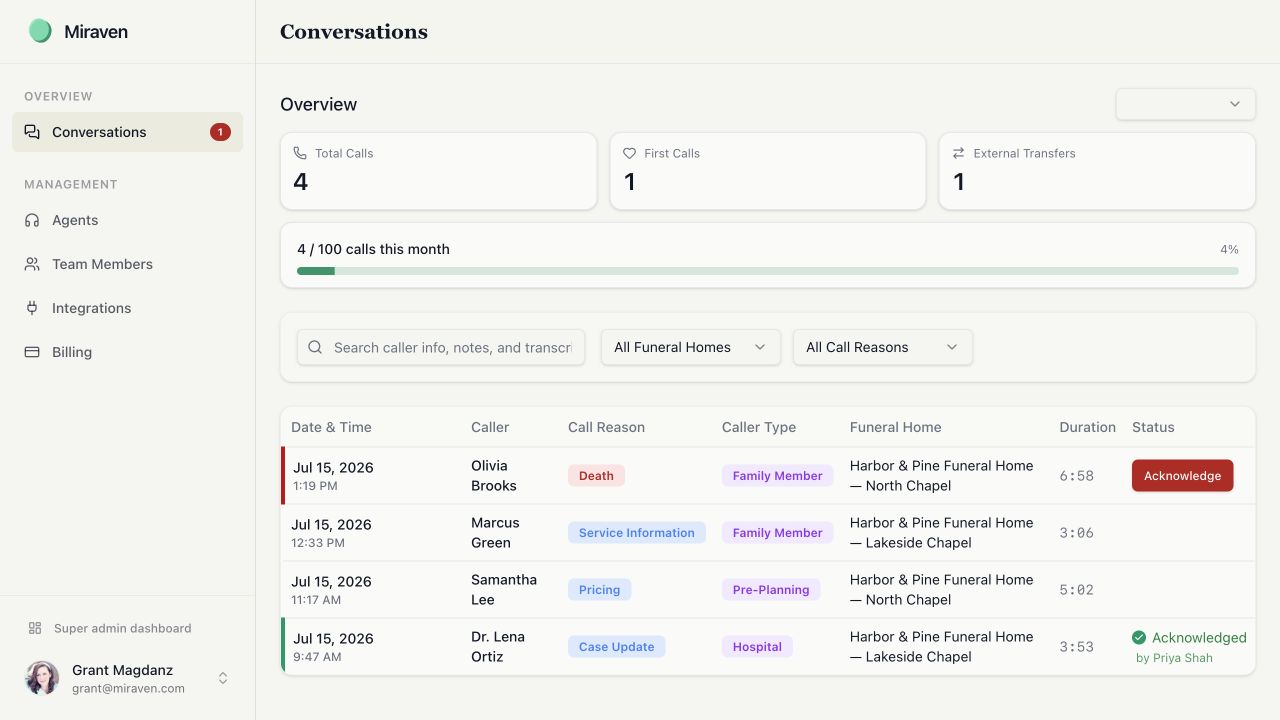
Know where things live
Use the Miraven web portal
Review calls, manage staff, configure agents, and connect integrations.
Use the Miraven mobile app
See recent calls, listen to recordings, and manage on-call coverage.
Find recordings and transcripts
Play recordings, read or copy transcripts, and download recording files from the web portal.
If something does not look right
Email support@miraven.com or call (201) 824-4343. Include the funeral home, affected agent or location, and the date and approximate time of any example call.
Still need help?
Email support@miraven.com or call (201) 824-4343.